
HYAS Insight R25.2
Release # | R25.2 |
|---|---|
Date |
What’s New in HYAS Insight!
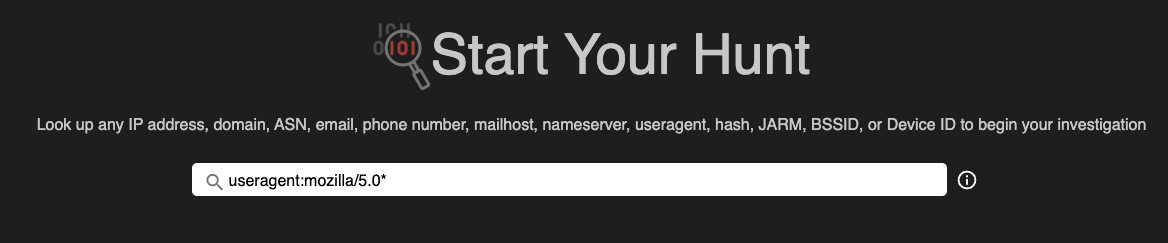
Increased Wildcard Search Support IMPROVEMENT
Adding to HYAS Insights already robust wildcard searching capabilities, threat investigators can now use wildcards to search against User Agents, Dynamic DNS Emails, and Dynamic DNS Domains, making it easier to uncover related values and unknown threats.
Benefits:
Faster Threat Identification – Discover related values without needing an exact match.
Expanded Search Capabilities – Use pattern-based searches to find more connections.
Streamlined Investigations – Reduce manual search efforts and enhance detection workflows.
Spatial Intelligence Improvements IMPROVEMENT
We’ve received overwhelmingly positive feedback on the Spatial Intelligence capabilities from previous releases, so we’re continuing to enhance the user experience, making it even easier, more intuitive, and more efficient. With this release, we’ve adding the following functionalities:
Adjust Queries Post-Execution – Expand, contract, or reposition your perimeter even after running a query, eliminating the need to start over.
Auto-Centering & Zooming – When defining a perimeter, the system automatically centers and zooms for optimal visibility.
Clearer Max-Results Notification – A new pop-up alerts users when the 1,000-result limit is reached, offering direct options to display results or refine the query.
Benefits:
Maintain Investigation Flow – Adjust your perimeter post-query without disrupting your workflow or losing context.
Faster Decision-Making – Instantly see when the max-results limit is reached and take immediate action with clear options.
More Intuitive Interaction – Visual enhancements, like thicker borders and layering improvements, make it easier to manipulate query perimeters.
New Maltego Integration Transforms NEW
We’ve expanded our network security insights by introducing more granular data extraction for Host Posture, CVE detection, and JARM fingerprinting. These enhancements improve visibility and streamline threat analysis.
Get Host Posture from IPv4
More Granular Visibility – Each open port is now represented as a distinct object, making it easier to analyze individual services.
Standardized Naming – Object names follow the n/P format (e.g., 53/UDP) for consistency.
Enhanced Service Insights – Includes Service Banner data in a multi-line property for deeper inspection.
Improved Classification – Adds Transport (TCP/UDP) and Protocol (e.g., DNS, SSH) properties for more accurate categorization.
Get CVE from Service Port
Actionable Risk Data – Generates a distinct object for each CVE tied to a Service Port and IP, enabling precise vulnerability tracking.
Get JARM from Service Port
Better Threat Detection – Creates a unique object for each JARM fingerprint.
Expanded Fingerprint Extraction – Extracts JARM values from port 443 and other relevant ports to enhance TLS-based threat identification.
Benefits:
Improved Network Visibility – More granular object creation for open ports, CVEs, and JARM fingerprints allows for better tracking and analysis.
Standardized & Structured Data – Clear naming conventions and added protocol properties ensure consistency and ease of use.
Enhanced Security Insights – Deeper service analysis and vulnerability detection help identify threats faster and with greater accuracy.
Removed “Beta” from Verdicts IMPROVEMENT
Insight Verdicts is now officially out of beta and fully supported for all users.
Benefits
Production-Ready Feature – Insight Verdicts has been validated for accuracy, stability, and performance.
Increased Confidence – Users can trust the feature for critical intelligence decisions without concerns about beta limitations.
Ongoing Enhancements – Future updates and refinements will continue to improve the feature based on user feedback.

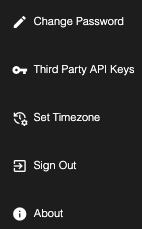
Limited Timezone Support NEW
timezone support is now available in Account Management, improving visibility and accuracy for admins reviewing account changes.
Timezone-Accurate Logs – Account changes and updates are now displayed in the admin’s configured timezone, making it easier to track and review actions.
Improved Analysis & Auditing – View account activity in your local time for better assessment and faster decision-making.
More Intuitive Experience – Reduce confusion by eliminating discrepancies between displayed timestamps and actual working hours.

Investigational data will still be returned in UTC.
Tag Display and Sort Additions IMPROVEMENT
Tags are now displayed in the C2 and Malware tables, improving threat visibility and analysis. Previously, tags were only accessible within detailed views, requiring extra steps for identification. Now, users can see and leverage tag information directly in the main tables.
Key Benefits:
Enhanced Threat Visibility – Quickly identify and categorize threats without extra clicks.
Faster Investigations – Streamline analysis by viewing tag data at a glance.
Improved Workflow Efficiency – Reduce the need for unnecessary navigation and speed up decision-making.