HYAS Insight R25.3
Release # | R25.3 |
|---|---|
Date |
What’s New in HYAS Insight!
Spatial Intelligence Map Searching Enhancements IMPROVEMENT
We’ve added a map search feature to help you quickly find and navigate to specific locations within the Spatial Intel map.
Powerful location search – Enter addresses, cities, landmarks, or coordinates to instantly locate places on the map.
Map response with visual cues – Once a location is selected, the map automatically zooms, repositions, and drops an indicator pin.
Supports multiple coordinate formats – Enter latitude/longitude in decimal degrees, DMS, DDM, and more.
Benefits
Faster navigation – Quickly jump to the right location without manually panning and zooming.
More precise searches – Match-as-you-type results help ensure you select the correct place, reducing errors.
Enhanced usability – Visual indicators and automatic map adjustments make interacting with spatial data more intuitive.

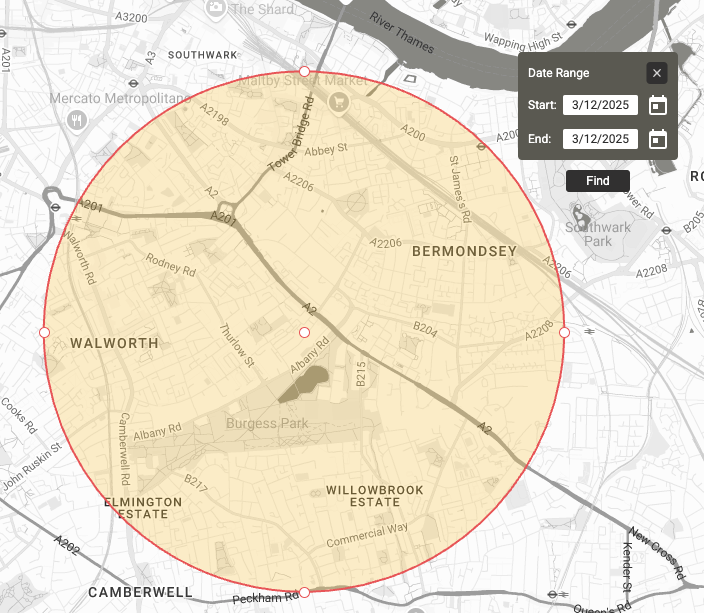
Spatial Intelligence Date Picker Relocation IMPROVEMENT
We’ve improved the placement of the date input box to provide a clearer view of selected geozones.
Unobstructed geozone visibility – The date input box no longer covers the center of the geozone, making it easier to see and interact with.
Optimized positioning – Now placed in the upper right corner with slight padding, ensuring a clean and intuitive layout.
No interference with existing elements – The update does not affect the red box that appears under certain conditions.
Historical Host Posture Data IMPROVED
HYAS Insight now includes historical Host Posture data, enabling analysts to track changes and analyze trends over time.
Benefits
Access up to 90 days of historical data – View past Host Posture states alongside real-time data for better security event correlation.
Improved threat analysis – Detect anomalies and investigate posture changes that may indicate evolving threats.
Timestamped records – A new column displays when each data point was observed, providing clearer insights for incident response and reporting.