
HYAS Insight R25.9
Release # | R25.9 |
|---|---|
Date |
What’s New in HYAS Insight!
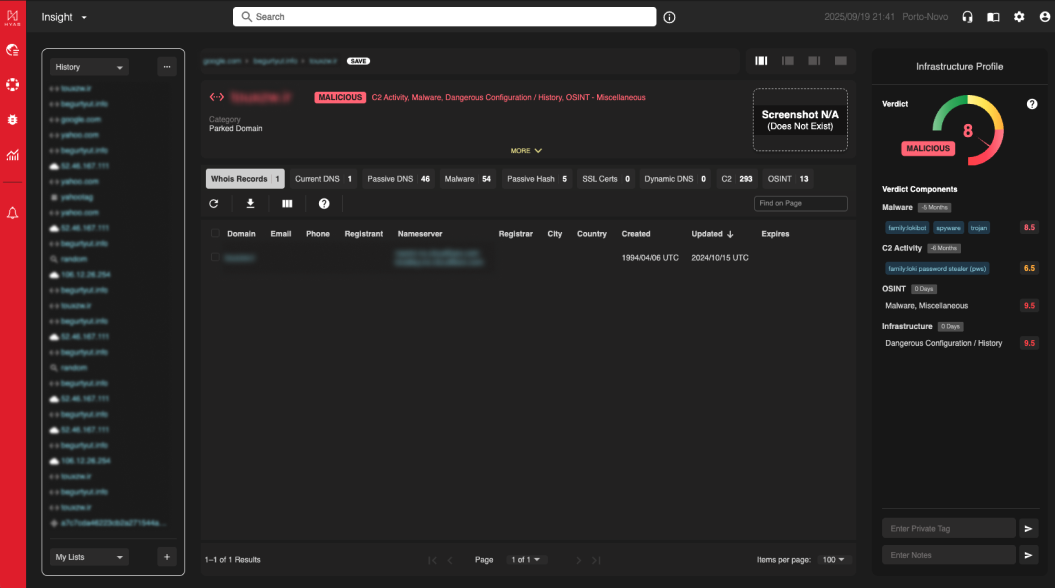
HYAS Insight UI Redesign NEW
We’ve completely redesigned the HYAS Insight user interface to make investigations smoother, faster, and more intuitive. The new UI introduces collapsible panels, dynamic layouts, upgraded object headers, better tab behaviors, and a cleaner, consistent design throughout the platform—making the experience more approachable for analysts of all skill levels.
Benefits
Flexible Panel Modes – Switch between multiple panel configurations to maximize screen space for what matters most.
Improved Lists and History – Save and organize investigative trails or key indicators, with drag-and-drop and sharing capabilities.
Dynamic Object Detail Tabs – Tabs only appear when data exists, keeping the UI focused and relevant.
Enhanced Object Headers – Get rich, object-specific context (e.g., ASN, Device ID, Filehash) with expandable views and screenshot/map previews.
Approachable for All Users – Designed to reduce complexity and speed up learning, enabling junior analysts and cross-functional teams to engage more effectively.
Consistent, Polished Styling – Enjoy a modern visual refresh that aligns with HYAS Protect and improves usability across the board.
Infrastructure Profile NEW
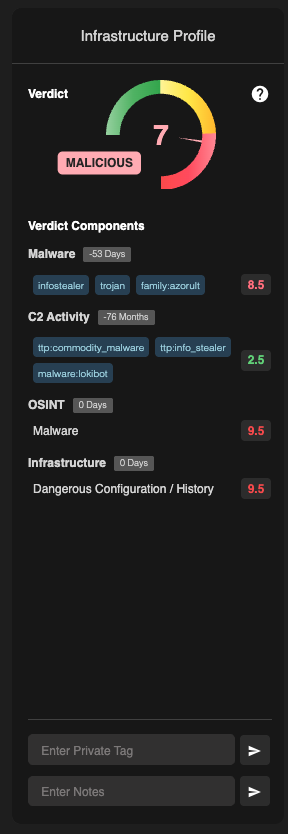
he Infrastructure Profile panel in HYAS Insight has been fully redesigned for clarity, accessibility, and efficiency. The new layout offers object-specific headers and expandable views that combine detailed data with concise visual summaries—supporting both quick assessments and deep dives.
Benefits
High-Level Summaries – Key object insights like verdict, ownership, and geolocation are available at a glance.
Expandable Technical Detail – Click to reveal rich data such as ASN, WhoIs, certificate info, GPS mapping, and related hashes.
Object-Specific Views – Each object type presents the most relevant data in a way that makes sense for analysts.
Best of Both Worlds – Combines digestible summaries with full technical context, enhancing usability for both junior and senior users.
Modern UI Styling – Improved spacing, color-coding, and interactivity deliver a more polished and intuitive experience.
RDAP-Powered Current Registration Panel NEW
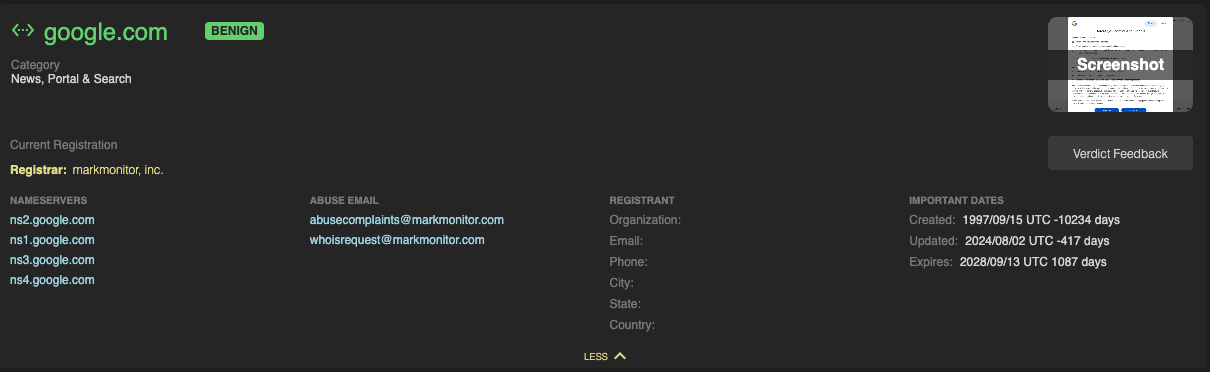
The Current WHOIS panel has been replaced with Current Registration data, now located in a new section of HYAS Insight and powered entirely by RDAP.
Why RDAP Matters:
RDAP is the industry successor to WHOIS. Unlike traditional WHOIS — which is often rate-limited, unstructured, and unreliable — RDAP provides clean data via secure, standardized web protocols. It ensures faster lookups, more data, and a more consistent analyst experience. RDAP also enables future enhancements like richer abuse contact data and extended record details.
Benefits:
Faster and More Reliable
RDAP offers structured, real-time data with fewer blocks and better performance than traditional WHOIS queries.Streamlined Data Source
Eliminates data merges and fallback complexity by using a single, normalized data model.Future-Proof Architecture
Sets the foundation for richer parsing and integration with RDAP-native features like vCard extensions.
Expanded Passive DNS Coverage IMPROVED
We’ve expanded the Passive DNS dataset used in HYAS Insight. Now, when you perform lookups on domains or IPs, you’ll see more comprehensive resolution histories in both the UI and API — helping you make stronger links and better decisions.
Benefits:
More Resolution Data
Expanded DNS records give you increased visibility into the lifecycle of IPs and domains.Fully Unified View
New data is automatically blended with existing results for a seamless investigative experience.No Action Needed
The upgrade works silently in the background — the same workflows, now with more insight.
Generic Search History & Breadcrumbs IMPROVED
Generic searches are now saved in both History and Breadcrumbs.
This lets analysts quickly return to exploratory search queries just as easily as they do with specific objects.
Benefits:
Better Investigative Flow
Easily retrace broad or exploratory searches to continue investigations without retyping.Consistent Navigation
Generic searches now behave like all other objects in both History and Breadcrumb trails.Visual Clarity
A magnifying glass icon identifies generic searches, making them easy to spot in History.