
20230418.6
What’s New in HYAS Insight
Verdict Context
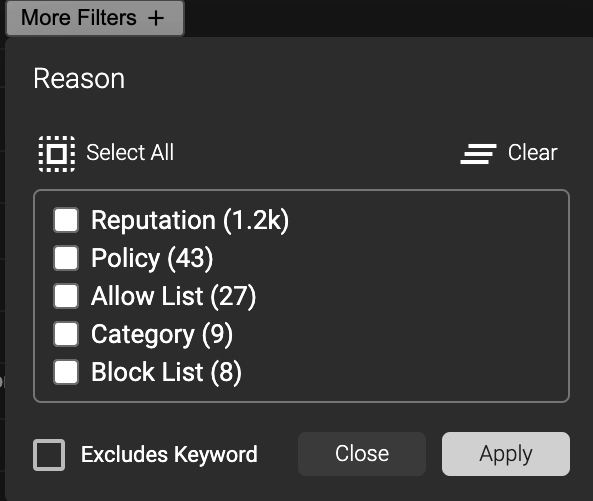
A new column, labeled “Reason” has been added to the Logs view
The “Reason” column can be one of five (5) values: (Category, Allow List, Block List, Policy, or Reputation)
Category - A specific Category has triggered a “Blocked” Status
Allow List - An artifact (FQDN, Domain, IP Address, CIDR, Nameserver, or Registrar) is on an Allow List and thus “Permitted” Status
Block List - An artifact (FQDN, Domain, IP Address, CIDR, Nameserver, or Registrar) is on a Block List and thus “Blocked” Status
Policy - A Policy has been triggered as Allow or Block via a Rule that matches Type (24), Condition, and Value and thus “Permitted” or “Blocked” Status
Reputation - Determined via our propriety calculation which may be “Permitted”, “Blocked”, “Highly Suspicious”, “Watch Engine” or “No Status”
When the traffic of the above Reason exists in your Logs view, each can be filtered appropriately through the new “Reason” filter available from the “More Filters +” button:
Deployment Mode column
We've added a column called “Deployment Mode” to distinguish the mode in which HYAS Protect was operating at the moment that the alert was triggered. It can have one of 3 values:
Protection
Inspection
Passthrough
By an Admin, the Deployment Mode can be toggled through the “Global Settings” and can be set to either:
Protection
Inspection
Improvements!
Additional Traffic option: “No Status”
Previously, the Traffic options were limited to:
Blocked
Highly Suspicious
Watch Engine
Permitted
In the newest release, the explicit “No Status” option has been added. The same result was possible by selecting the four (4) options and “Excludes Keyword”; however, we've improved ease of use by implementing the status explicitly.

Additional Aggregations: Category, Client IP, and Tag
Following the introduction of 3 new artifacts, the “Aggregate Logs” capability now enables the ability to hone in on up to eight (8), they include:
Country
Device Name
Domain
FQDN
Status
NEW!
Category
Client IP
Tag